Home›Gaming›Best Gaming Monitors for PC and Console Gaming
Gaming
Best Gaming Monitors for PC and Console Gaming
The best gaming monitors combine high refresh rates, low response times, adaptive sync, and image quality tailored to your games and hardware. Our selection includes OLED, Mini-LED, and standard LCD monitors for competitive gaming, immersive single-player experiences, and everyday use. We've selected monitors with high professional test scores, consistently positive user reviews, and practical features. Options include 1440p, 4K, high refresh rates, and budget-friendly options.
Some links on this page are affiliate links. If you buy through them, we may earn a commission at no extra cost to you.
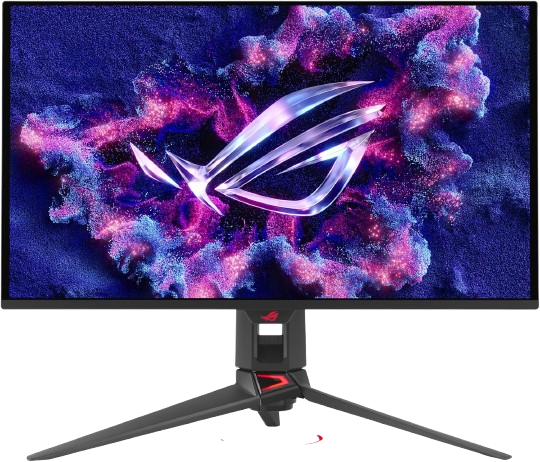
The PG27UCDM is a 26.5-inch 4K QD-OLED gaming monitor with a 240Hz refresh rate and 0.03ms GTG response time. It also includes DisplayPort 2.1, HDR10 support, OLED care features, and a high pixel density that makes games and desktop text especially sharp. ASUS lists 99% DCI-P3 coverage and a peak HDR brightness of 1,000 cd/m² for supported content.
Why we love it
4K resolution produces exceptionally detailed images on a compact 27-inch-class screen.
A 240Hz refresh rate provides unusually smooth motion for a 4K monitor.
QD-OLED delivers deep blacks, vivid colors, and extremely fast pixel response.
DisplayPort 2.1 is useful for compatible next-generation graphics cards.
OLED Care Pro and OLED Anti-Flicker 2.0 address common OLED ownership concerns.
Watch out for
It is expensive compared with excellent 1440p gaming monitors.
You need a powerful graphics card to take full advantage of 4K at 240Hz.
OLED remains less suitable than LCD for heavy, repetitive desktop use because static elements can contribute to image-retention risk.
Best for: Enthusiasts who want one monitor for high-end PC gaming, detailed 4K visuals, and fast competitive play.
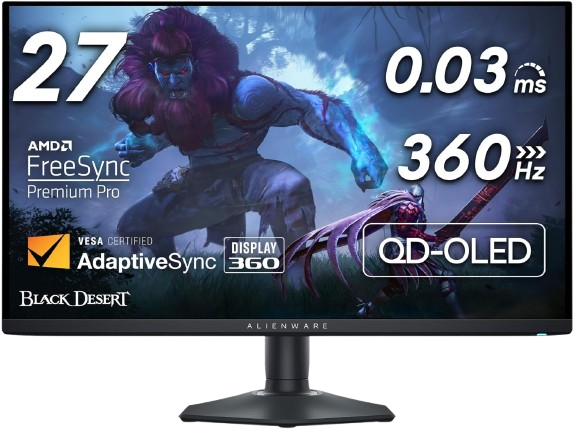
The AW2725DF combines a 26.7-inch QHD QD-OLED panel with a 360Hz refresh rate and 0.03ms response time. It supports AMD FreeSync Premium Pro, offers a height-, tilt-, swivel-, and pivot-adjustable stand, and reaches 360Hz through DisplayPort; HDMI supports QHD at up to 144Hz.
Why we love it
360Hz at 1440p is an excellent balance of speed, sharpness, and GPU demand.
QD-OLED provides near-instant response and strong contrast.
The adjustable stand is more versatile than many premium gaming-monitor stands.
FreeSync Premium Pro and VESA AdaptiveSync support help reduce tearing.
Alienware’s three-year OLED panel warranty is a reassuring ownership feature when included with the applicable model and region.
Watch out for
HDMI is limited to 144Hz at QHD, so high-refresh PC gaming should use DisplayPort.
OLED brightness can be less impressive in very bright rooms than a strong Mini-LED display.
It costs more than many fast IPS monitors and still requires sensible OLED-care habits.
Best for: PC gamers who prioritize fluid 1440p competitive gaming without moving to a 4K display.
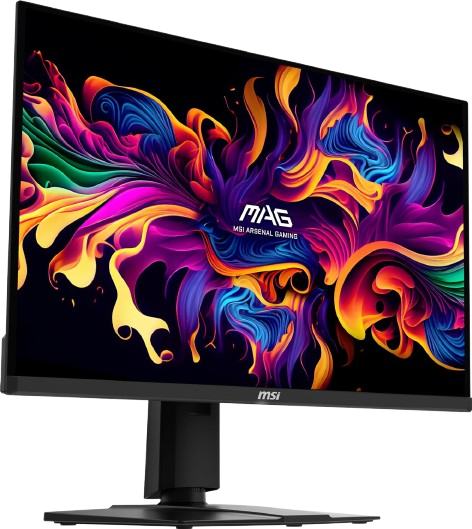
The MSI MAG 271QPX QD-OLED is a 26.5-inch QHD monitor with a 360Hz refresh rate, 0.03ms GTG response time, and QD-OLED technology. MSI specifies 99% DCI-P3 coverage, DisplayHDR True Black 400, HDMI 2.1, DisplayPort, USB-C connectivity, and height adjustment.
Why we love it
It offers the same attractive 1440p, 360Hz, QD-OLED formula sought by serious PC gamers.
The pixel response is fast enough to keep high-refresh motion clean.
HDMI 2.1 and USB-C make the monitor more flexible for mixed gaming setups.
Wide-gamut color is useful for games, video, and general media.
Its specifications are competitive with more expensive premium OLED models.
Watch out for
The 360Hz version is best suited to a powerful gaming PC.
OLED care remains important if the monitor will display static windows for long periods.
Check the exact Amazon listing because the MAG 271QPX QD-OLED E2 is a separate 240Hz variant.
Best for: Buyers who want a premium 1440p OLED experience with extensive connectivity.
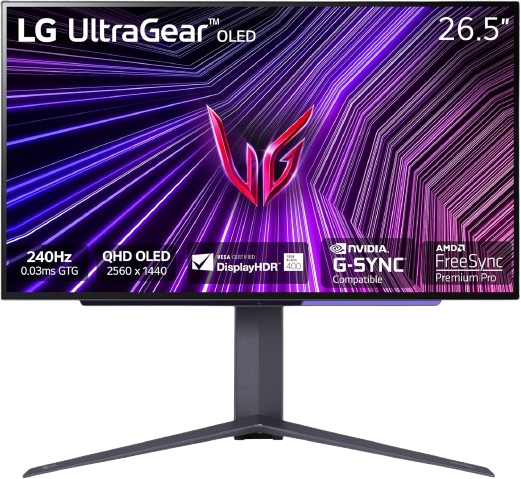
The 27GS95QE-B is a 27-inch QHD OLED monitor designed around a 240Hz refresh rate and 0.03ms response time. It supports AMD FreeSync Premium Pro and NVIDIA G-SYNC compatibility, includes HDMI 2.1 and DisplayPort, and has a height-, tilt-, swivel-, and pivot-adjustable stand.
Why we love it
240Hz and QHD resolution suit both competitive and cinematic games.
OLED contrast makes dark scenes look more convincing than on most IPS displays.
FreeSync Premium Pro and G-SYNC compatibility support both major GPU ecosystems.
HDMI 2.1 improves compatibility with current consoles and gaming PCs.
The flexible stand makes it easier to position correctly at a desk.
Watch out for
It may be less bright than a good Mini-LED monitor in a sunlit room.
The OLED panel needs care when used for work with fixed windows or toolbars.
Some competing 1440p OLED monitors now offer 360Hz for a similar premium price.
Best for: Gamers who want a well-rounded 1440p OLED monitor from an established display brand.
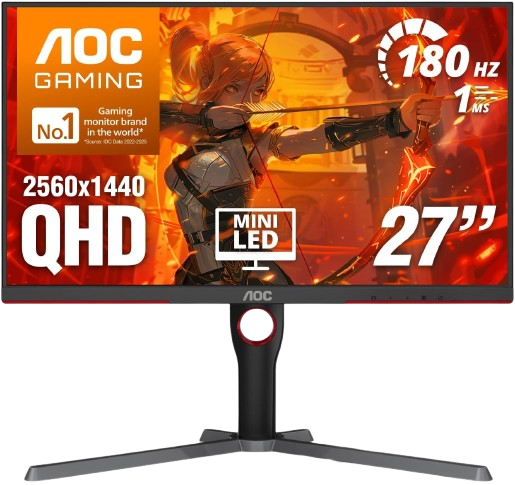
The Q27G3XMN is a 27-inch QHD Mini-LED gaming monitor with a 180Hz refresh rate and 1ms GTG response specification. Its VA panel uses 336 local-dimming zones, supports HDR, includes a height-adjustable stand, and is listed for PC and console compatibility. RTINGS describes it as an impressive budget gaming monitor with better picture quality than many low-cost alternatives.
Why we love it
Mini-LED local dimming gives it stronger HDR contrast than typical budget IPS monitors.
QHD resolution is a noticeable upgrade over 1080p at 27 inches.
180Hz is fast enough for smooth mainstream PC gaming.
The price is usually far below comparable OLED models.
The height-adjustable stand and multiple video inputs improve everyday usability.
Watch out for
VA panels can show dark-level smearing in some fast-moving scenes.
Local dimming may produce visible blooming around bright objects on dark backgrounds.
Its 180Hz ceiling is less suitable than 240Hz or 360Hz monitors for top-level esports play.
Best for: Budget-conscious gamers who want strong contrast and HDR without paying OLED prices.
The ASUS ROG Swift OLED PG27UCDM monitor deserves the top spot because it combines the most comprehensive set of high-end features in this group. The 4K resolution delivers impressive clarity for games, photos, and text, while the 240Hz refresh rate and 0.03ms response time maintain the smoothness and responsiveness expected of a premium gaming monitor. The QD-OLED panel adds deep blacks and a wide color gamut, and DisplayPort 2.1 makes it more prepared for more modern graphics hardware than many competing 4K displays. ASUS also includes OLED-specific features like OLED Care Pro and Anti-Flicker 2.0. The monitor is expensive and requires a powerful PC, but buyers capable of running 4K at high frame rates get an exceptionally strong combination of image quality, speed, connectivity, and long-lasting features.
How we picked
We selected these gaming monitors based on resolution, refresh rate, response time, adaptive sync support, HDR performance, connectivity, ergonomics, warranty coverage, and current availability on Amazon. OLED models were considered for their near-instant pixel response and exceptionally deep blacks, while Mini-LED and LCD alternatives were evaluated for brightness, durability, value for money, and suitability for rooms with static desktop content. We also considered the suitability of each monitor for its target audience: professional PC gamers, console owners, content creators, or buyers upgrading from a basic 60Hz display. Recommendations are based on manufacturer specifications, expert reviews, long-term user feedback, and feature comparisons, not personal testing. We paid extra attention to models that consistently appear in professional tests and have positive customer reviews on Amazon, while also noting important limitations such as OLED screen burn-in, HDMI refresh rate limitations, motion artifacts, and the graphics card performance required to use very high resolutions or refresh rates.
Frequently Asked Questions
A 144Hz or 165Hz monitor is a strong starting point for most PC gamers because it makes motion noticeably smoother than 60Hz. Competitive players with powerful systems may benefit from 240Hz or 360Hz, but the improvement becomes less important if your games rarely reach those frame rates.
1440p is usually the better value because it requires less graphics horsepower while still looking sharp on a 27-inch display. 4K provides finer detail, but it is most worthwhile when you have a high-end GPU, play visually demanding single-player games, or want the monitor to double as a high-resolution productivity display.
OLED generally offers faster pixel response and perfect-looking blacks, making it excellent for dark games and fast motion. Mini-LED can become brighter, often costs less, and is a safer choice for a monitor that will display static work windows for many hours, although local dimming can create some blooming.
Often, yes. Several monitors in this guide support their maximum PC refresh rate through DisplayPort, while HDMI may have a lower limit; for example, the Alienware AW2725DF supports QHD at 360Hz through DisplayPort but QHD at 144Hz through HDMI. Always check the monitor’s manual and use a suitable cable rather than assuming every HDMI port supports the advertised maximum.
They can, but console output is limited by the console and the monitor’s HDMI implementation. A 4K monitor can be useful for compatible console gaming, while a 1440p monitor may offer a lower-cost option; verify HDMI 2.1 support, supported resolution, and the available console refresh modes before buying.
For most players, 240Hz offers an excellent mix of responsiveness and value. A 360Hz display makes more sense for competitive players who consistently produce very high frame rates and are willing to pay for smaller latency and motion improvements; otherwise, better resolution, HDR, contrast, or panel quality may be a more noticeable upgrade.