Home›Gaming›Best Gaming Mouse: 5 Top Picks for Every Gamer
Gaming
Best Gaming Mouse: 5 Top Picks for Every Gamer
The best gaming mouse should be comfortable, track your movements accurately, and be suitable for the games you play. We compared five well-respected models from Razer and Logitech, including lightweight esports mice, ergonomic wireless options, and a versatile wired design. Our selection covers competitive FPS games, larger hands, programmable controls, and budget-conscious buyers. The Razer DeathAdder V4 Pro is our top overall pick for its combination of comfort, performance, battery life, and wireless connectivity.
Some links on this page are affiliate links. If you buy through them, we may earn a commission at no extra cost to you.
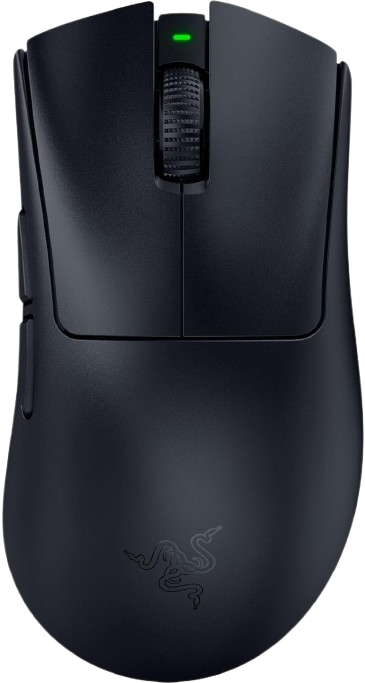
The DeathAdder V4 Pro is a lightweight, right-handed wireless gaming mouse designed around an ergonomic shape. It combines a 45,000-DPI sensor, up to 8,000Hz polling, optical switches, an optical scroll wheel, and up to 150 hours of battery life after the latest firmware update.
Why we love it
Comfortable ergonomic shape that particularly suits palm and relaxed claw grips.
Very low weight for a right-handed ergonomic mouse, at approximately 57–58g depending on color.
High-end sensor performance with up to 45,000 DPI, 900 IPS tracking, and 85G acceleration.
Supports true 8,000Hz polling in both wired and wireless modes for highly responsive competitive play.
Up to 150 hours of battery life and an optical scroll wheel that may offer better long-term durability than a conventional mechanical encoder.
Watch out for
The right-handed ergonomic shape may feel too large or restrictive for smaller hands.
It has fewer programmable controls than feature-heavy productivity-oriented gaming mice.
The high price and advanced polling features are difficult to justify for casual gaming or basic desktop use.
Best for: Competitive FPS players who want an ergonomic wireless mouse with excellent performance and long battery life.
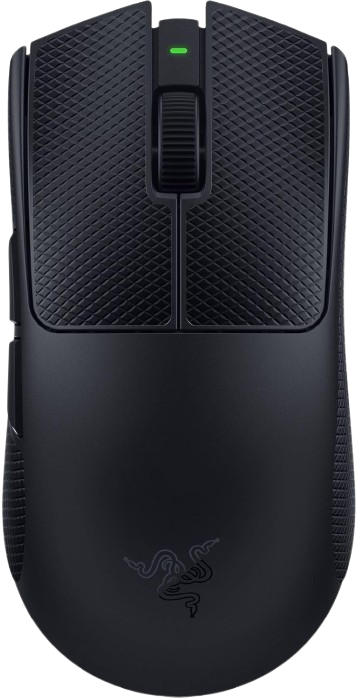
The Viper V4 Pro is a lightweight, symmetrical wireless mouse aimed at competitive esports players. Its Amazon listing identifies a 49g design, 50,000-DPI optical sensor, 8,000Hz polling, Gen-4 optical switches, and up to 180 hours of battery life.
Why we love it
Extremely light construction helps reduce fatigue during long, low-sensitivity FPS sessions.
Symmetrical shape works well for claw and fingertip grips and accommodates more hand positions than an ergonomic design.
8,000Hz polling and a high-resolution optical sensor provide ample performance for high-refresh-rate gaming.
Optical switches are designed to reduce the risks associated with traditional mechanical switch wear.
Long claimed battery life makes it practical for users who prefer wireless play without frequent charging.
Watch out for
The low-profile symmetrical shape may provide less palm support than the DeathAdder V4 Pro.
Competitive features such as 8,000Hz polling require a capable PC and high-refresh-rate display to show their full benefit.
Its premium price is difficult to justify if you mainly play slower-paced games.
Best for: Competitive FPS players who prefer a symmetrical, ultra-lightweight mouse.
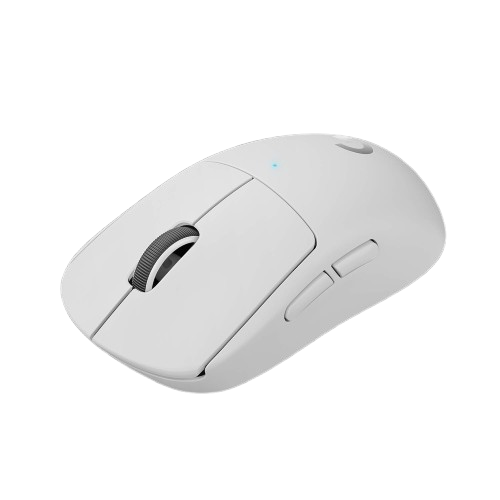
The PRO X SUPERLIGHT 2 is a lightweight wireless mouse with a simple five-button layout and a symmetrical shape. Professional testing highlights its strong build quality, very low click latency, accurate sensor performance, USB-C charging, and support for up to 8,000Hz wireless polling.
Why we love it
Lightweight design makes it easy to control during competitive FPS games.
Excellent click and sensor latency performance according to standardized professional testing.
Clean, uncomplicated shape suits users who do not need numerous side buttons.
USB-C charging is more convenient than older proprietary charging connectors.
LIGHTSPEED wireless performance is designed for competitive play, while PC and Mac compatibility improves flexibility.
Watch out for
It does not support Bluetooth, so wireless use requires its dedicated receiver.
The scroll wheel lacks free-scrolling and left/right tilt inputs.
Five programmable buttons may feel limiting for MMO players, productivity users, or anyone who needs many shortcuts.
Best for: FPS players who want a proven lightweight wireless mouse with a straightforward control layout.
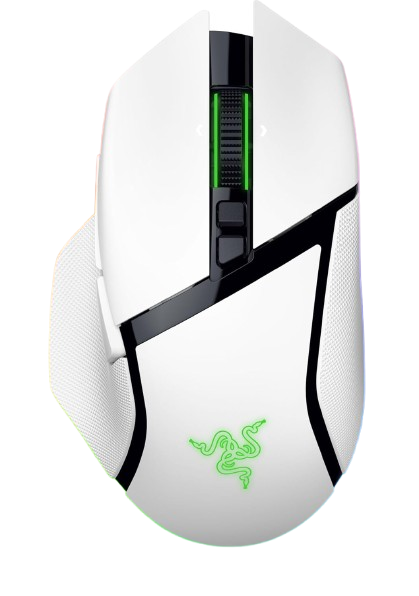
The Basilisk V3 Pro 35K is a feature-rich right-handed wireless mouse with an ergonomic shape, RGB lighting, a tilt-enabled HyperScroll wheel, and numerous customizable controls. Its Amazon listing specifies 13 customizable controls, a 35,000-DPI optical sensor, Gen-3 optical switches, and up to 140 hours of battery life.
Why we love it
Much more versatile than an esports-focused mouse because it offers 13 customizable controls.
Ergonomic thumb rest and right-handed shape provide good support for general gaming and desktop work.
HyperScroll tilt wheel is useful for navigating documents, web pages, menus, and games.
RGB lighting and extensive remapping options make it easy to personalize.
Wireless operation and up to 140 hours of claimed battery life reduce cable clutter and charging interruptions.
Watch out for
It is considerably heavier than lightweight FPS-focused mice.
The large number of controls can feel unnecessary or awkward for minimalist setups.
The ergonomic shape is designed for right-handed users and may not suit smaller hands.
Best for: Gamers who want one wireless mouse for gaming, productivity, shortcuts, and customizable controls.
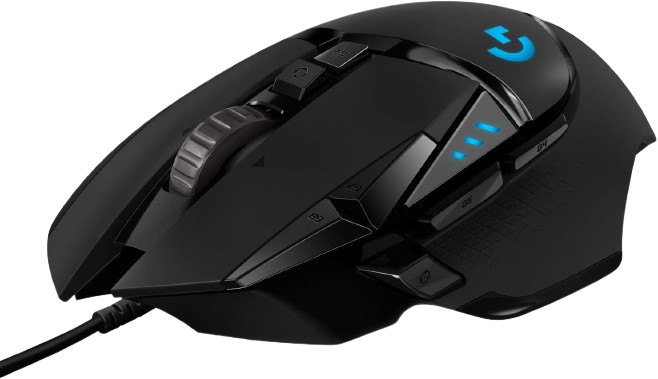
The G502 HERO is a wired gaming mouse built around a familiar ergonomic shape, adjustable weights, RGB lighting, and a large number of programmable buttons. The Amazon listing specifies a HERO sensor with up to 25,600 DPI, 11 programmable buttons, onboard memory, and PC/Mac compatibility.
Why we love it
Usually offers strong feature value compared with premium wireless gaming mice.
Eleven programmable buttons work well for MMOs, strategy games, action games, and productivity shortcuts.
Adjustable weights let users tailor the mouse’s balance and overall feel.
Wired USB connectivity eliminates battery charging and wireless-interference concerns.
Long-running popularity and broad PC/Mac compatibility make it an accessible first gaming mouse.
Watch out for
Its heavier body is less suitable for fast, low-sensitivity competitive FPS play.
The cable can create drag compared with a good wireless mouse.
The older design is less minimal and less lightweight than newer esports-oriented models.
Best for: Budget-conscious gamers who want many buttons, adjustable weight, and dependable wired performance.
The Razer DeathAdder V4 Pro mouse deserves the top spot because it offers the broadest feature set without being overly specialized. Its ergonomic right-handed shape provides palm-grip or claw-grip players with more support than most ultra-light ambidextrous mice, and its weight of approximately 57–58g makes it maneuverable. The Focus Pro 45K sensor, 8000Hz polling rate, optical switches, and optical scroll wheel deliver performance that far exceeds the demands of most games, while still remaining practical rather than gimmicky. An updated battery life of up to 150 hours also makes wireless use convenient. RTINGS identifies it as a strong alternative for larger hands and palm grips, and Razer's specs support the capabilities of the sensor, polling rate, switches, and battery. Its main limitation is its right-handed shape, but for most users looking for a premium all-around gaming mouse, its balance of comfort and performance is hard to beat.
How we picked
We selected these gaming mice by comparing the factors most influential in everyday gaming: shape, weight, sensor performance, click technology, wireless reliability, battery life, button layout, software, compatibility, and price. We examined manufacturer specifications from Razer and Logitech and then compared this data with professional testing results from RTINGS, PCMag, Tom's Guide, IGN, and other reputable tech publications. We also considered user reviews and regular discussions in the r/MouseReview community on Reddit, focusing on comfort, durability, scroll wheel performance, software issues, and wireless stability. We checked Amazon listings to ensure the recommended models were active in the US and popular with buyers. Recommendations are based on manufacturer specifications, expert reviews, user feedback, and feature comparisons, not personal testing. Ratings reflect a balance of performance, comfort, functionality, reliability, and price, not simply maximum DPI or polling rate. Because hand size, grip style, game genre, and sale prices vary, each mouse is assigned a practical purpose rather than being considered a universally ideal option.
Frequently Asked Questions
Start with shape, size, and grip compatibility rather than maximum DPI. Check whether you prefer a right-handed ergonomic design or a symmetrical shape, then consider weight, button count, sensor performance, wireless reliability, battery life, and software. For competitive FPS gaming, low weight and consistent click latency generally matter more than having numerous programmable buttons.
A modern 2.4GHz wireless gaming mouse can deliver performance comparable to a wired model, particularly when it uses a dedicated low-latency receiver. Wireless models offer a cleaner desk and more freedom of movement, but they cost more and require charging. A wired mouse such as the Logitech G502 HERO remains a good value if you do not want to manage batteries or receivers.
Most players do not need either specification at its maximum setting. Higher polling rates can reduce input intervals, but the difference is most relevant with a high-refresh-rate monitor and a PC capable of maintaining high frame rates. DPI is mainly a sensitivity range; sensor accuracy, shape, control, and your preferred in-game sensitivity are more important than the maximum number.
A frequent mistake is buying based only on reviews or specifications while ignoring hand size and grip style. A lightweight mouse can still feel uncomfortable if its hump, width, or button placement does not match your hand. Buyers also sometimes choose an MMO-style mouse with many buttons for FPS gaming, where extra weight and controls may hinder quick aiming.
The DeathAdder V4 Pro is better for users who want a right-handed ergonomic shape, more palm support, and a larger-hand fit. The Viper V4 Pro is the better choice for players who prefer a symmetrical, lighter design for claw or fingertip grip. Both support high-end sensors, optical switches, and 8,000Hz polling, so shape and grip preference should decide the purchase.
Yes, if you value programmable buttons, adjustable weights, and a lower purchase price more than low weight or wireless freedom. It remains particularly useful for MMOs, strategy games, and productivity shortcuts. Competitive FPS players should generally consider a lighter mouse such as the PRO X SUPERLIGHT 2 or Viper V4 Pro instead.