Best Mouse for MacBook: 6 Top Picks for Every User
Choosing the best mouse for your MacBook depends on what's most important to you: comfort, portability, gestures, precision, or price. The Logitech MX Master 4 for Mac is the most versatile option for demanding work. The MX Anywhere 3S for Mac is better suited for travel and small workspaces. The Apple USB-C Magic Mouse remains the most comfortable choice for users who value multi-touch gestures and Apple's minimalist design. We also included ergonomic vertical mice and affordable compact options for a variety of hand sizes and budgets. All recommended models support modern MacBook connectivity, but the best choice depends on your grip and workflow preferences.
Some links on this page are affiliate links. If you buy through them, we may earn a commission at no extra cost to you.
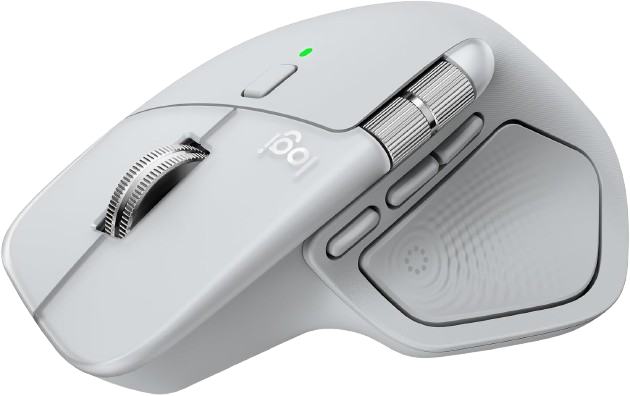
The MX Master 4 for Mac is a premium productivity mouse designed specifically for macOS and iPadOS. It combines an ergonomic right-handed shape, an 8,000 DPI sensor, MagSpeed scrolling, customizable controls, haptic feedback, and a rechargeable battery rated for up to 70 days.
Why we love it
Comfortable sculpted shape for long productivity sessions.
Precise tracking from 200 to 8,000 DPI.
MagSpeed wheel supports fast and controlled scrolling.
Haptic feedback and customizable controls add workflow flexibility.
USB-C charging and up to 70 days of claimed battery life.
Watch out for
Large, heavy design may not suit small hands.
Right-handed shape is unsuitable for left-handed users.
Advanced software features require Logitech’s configuration application.
Best for: Professionals, creatives, developers, and heavy MacBook users who want maximum productivity features.
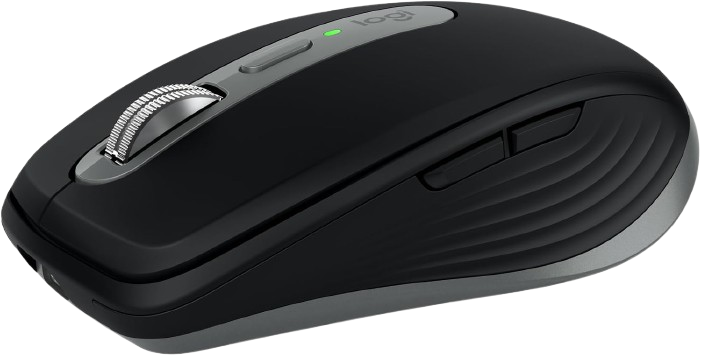
The MX Anywhere 3S for Mac delivers many of the MX Master line’s productivity features in a smaller, travel-friendly body. It offers 8,000 DPI tracking, quiet clicks, MagSpeed scrolling, USB-C charging, and a claimed battery life of up to 70 days.
Why we love it
Compact design fits easily into a laptop bag.
Tracks on many surfaces, including suitable glass surfaces.
Quiet clicks are well suited to shared offices and libraries.
MagSpeed scrolling is unusually capable for a compact mouse.
Works over Bluetooth and supports optional Logi Bolt connectivity.
Watch out for
Smaller body provides less palm support than the MX Master 4.
Logi Bolt receiver is sold separately.
Compact dimensions may feel cramped for large hands.
Best for: MacBook owners who regularly travel or switch between home, office, and mobile workspaces.
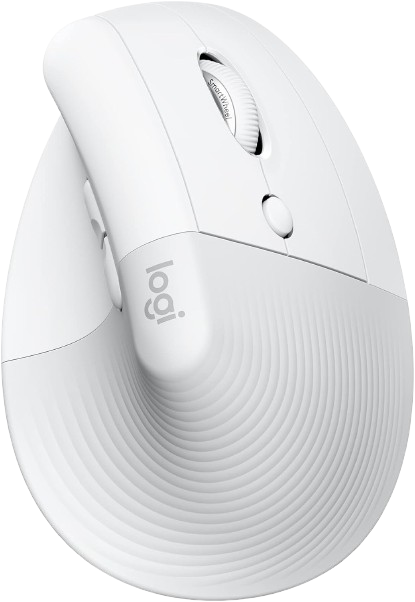
The Lift uses a 57-degree vertical design intended to place the hand in a more natural handshake position. It supports macOS, offers customizable controls, connects through Bluetooth or an optional Logi Bolt receiver, and uses one AA battery rated for up to two years.
Why we love it
Vertical grip can reduce the need to rotate the forearm.
Designed for small- to medium-sized hands.
Thumb rest and textured grip support controlled handling.
Bluetooth and optional receiver connectivity provide flexibility.
Long claimed battery life reduces charging interruptions.
Watch out for
Vertical design requires an adjustment period.
Usually less suitable for fast gaming or creative precision work.
Not ideal for left-handed users.
Best for: Office users seeking a more wrist-conscious mouse for extended daily computer work.
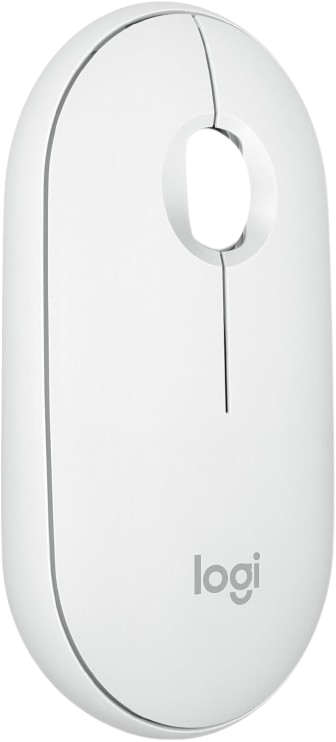
The Pebble Mouse 2 M350s is a slim, lightweight Bluetooth mouse aimed at everyday MacBook use and travel. It has silent-click technology, a customizable middle button, support for up to three devices, and a one-AA battery rated for up to 24 months.
Why we love it
Affordable design with useful everyday features.
Slim profile takes up very little space.
Silent clicks are suitable for quiet environments.
Supports switching between up to three devices.
Long claimed battery life with a standard AA battery.
Watch out for
Flat shape offers limited palm support.
Only three buttons provide fewer shortcuts.
Logi Bolt receiver is not included.
Best for: Students, commuters, and casual MacBook users who want a quiet, inexpensive wireless mouse.
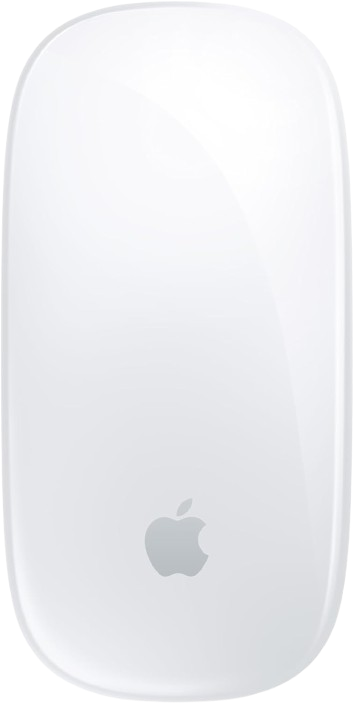
The USB-C Magic Mouse is the most visually integrated mouse for a MacBook and includes a smooth Multi-Touch surface for swiping and scrolling gestures. It connects wirelessly, recharges through USB-C, and supports Mac computers running macOS 15.1 or later according to Apple’s current product information.
Why we love it
Excellent visual match for Apple laptops and accessories.
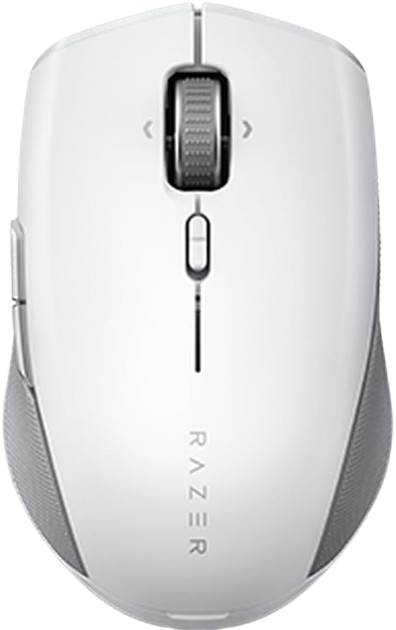
The Pro Click Mini is a compact productivity mouse with a 12,000 DPI optical sensor, Bluetooth and 2.4 GHz wireless connectivity, programmable controls, and a compact symmetrical shape. It runs on replaceable AA batteries, with manufacturer-rated battery figures of up to 725 hours over Bluetooth or 465 hours using 2.4 GHz wireless.
The Logitech MX Master 4 mouse for Mac deserves the top spot because it offers the most comprehensive combination of comfort, control, compatibility, and performance. Its ergonomic right-handed shape provides significantly better hand support than flat, compact mice, and its 8000 DPI sensor is suitable for precise work on a variety of surfaces. A MagSpeed scroll wheel, horizontal scrolling, customizable buttons, haptic feedback, and macOS-specific software make it especially useful for spreadsheets, research, editing, programming, and creative applications. It also supports Bluetooth and optional wireless connectivity, boasts a claimed battery life of up to 70 days, and supports fast charging via USB-C. Its size, weight, and right-handed design limit its appeal for some users, but for most MacBook owners who spend a lot of time at a desk, it offers the most powerful feature set and the best long-term value.
How we picked
These recommendations were selected based on an independent, research-based product analysis. We compared manufacturer specifications, official technical documentation, up-to-date compatibility information, professional product ratings, long-term user reviews, community discussions, and category comparisons. Particular attention was paid to macOS compatibility, Bluetooth reliability, USB-C charging or battery design, sensor performance, scrolling, button customization, ergonomics, portability, multi-device support, and overall value.
The analysis prioritized statements that appeared consistently across multiple independent sources, rather than a single review or isolated user opinion. Products were also compared based on their intended use: office work, travel, creative work, gaming, ergonomic support, and basic everyday navigation. Where sources differed, more recent manufacturer documentation and technically detailed information were given greater weight. Battery life figures are manufacturer estimates and may vary depending on usage. Thus, the recommendations reflect a balance of documented capabilities, compatibility data, reliability data, and user reviews available for each model.
Frequently Asked Questions
Prioritize reliable Bluetooth, macOS compatibility, comfortable shape, and a charging or battery system that suits your routine. USB-C charging is convenient with current MacBook accessories, while replaceable batteries can be useful for travel. Additional factors include button customization, scrolling quality, size, weight, and whether you need gestures or multi-device switching.
The Magic Mouse is better for users who specifically want Multi-Touch gestures, Apple styling, and a very slim design. The MX Master 4 is generally the stronger choice for long work sessions because it provides more ergonomic support, more physical controls, advanced scrolling, and broader customization. The decision mainly comes down to gesture preference versus comfort and productivity functionality.
Most modern Bluetooth mice can connect to a MacBook, but basic pointer movement does not guarantee full feature support. Custom buttons, scrolling modes, gesture functions, and configuration software may require macOS-compatible applications. Check the manufacturer’s operating-system requirements before buying, especially if your MacBook uses a recent macOS version.
Rechargeable mice are convenient because they avoid regularly buying disposable batteries and can often charge through USB-C while connected to the MacBook. Battery-powered models can be preferable for extended travel because a replacement battery restores operation immediately. Neither design is automatically more reliable; the better choice depends on whether convenience or easy emergency replacement matters more to you.
A compact mouse is easier to carry and works well with smaller hands or limited desk space. A larger ergonomic model usually provides better palm and thumb support for long sessions. Buyers often choose a travel mouse for everyday desk work and later discover that its small, flat body is less comfortable over several hours.
DPI describes cursor sensitivity, but a higher number does not automatically mean a better mouse. For ordinary office work, tracking accuracy, stable Bluetooth performance, comfortable shape, and a good scroll wheel matter more than maximum DPI. High DPI is most useful when you want precise control across large displays, high-resolution workflows, or gaming applications.